Workflo is a macOS menu-bar app for workspace automation: it opens the apps you need, arranges every window, and clears the rest, on its own, from your calendar, the clock, and display changes.
Moom earns its reputation
Moom has been a Mac power-user staple for over a decade, and its depth is real: the pop-up palette on the green zoom button, drag-out grids, custom commands, keyboard control, and layouts you can save and recall. As a way to place windows exactly where you want them, on demand, nothing in the category is more configurable. It's a one-time purchase from Many Tricks or the Mac App Store.
Credit where due — and the line that remains
Moom gets closer to acting on its own than any other tool in this space: it can re-apply a saved layout when your display configuration changes. If that's all you need, Moom may already serve you well. How its snapshots compare with Stay, Display Maid, and the rest of the field is covered in save & restore window layouts on Mac.
Two gaps remain, and they're the ones that decide this comparison. First, the layout Moom replays is a snapshot you saved by hand — when your working arrangement evolves, the snapshot goes stale until you remember to re-save it. Second, displays are its only automatic trigger. Nothing in Moom fires from your calendar or the clock, so the pre-call scramble and the focus-block setup are still yours. A Mac workday is a context switch every hour; Moom automates one kind of switch, after you've done the saving.
What Workflo does instead
Workflo isn't a faster way to arrange windows — it's the end of arranging them as a task.
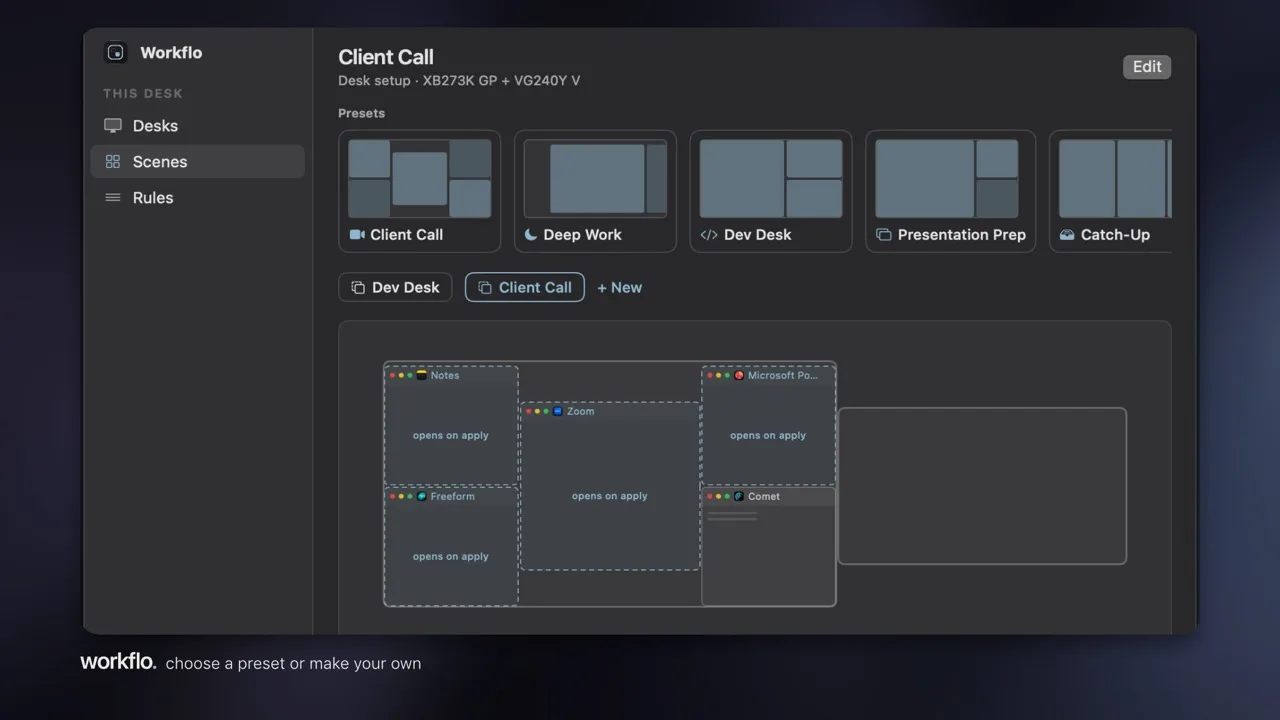
- The whole workspace, not just the windows. A Scene opens the apps that aren't running, places every window, and clears the rest. Moom acts on the windows you already have on screen.
- Layouts that stay current. Workflo learns your layout for every display setup on its own (it calls them Desks) and keeps learning as you work — there's no snapshot to save or re-save. When displays change, everything snaps back where it belongs.
- Before the moment. Scenes apply on their own from your calendar or the clock — the right apps are open, placed, and ready before the call or the focus block starts.
- When you need an empty screen. One hotkey stashes every window for a screen share; the same hotkey brings it all back.
At a glance
The difference is who initiates, who maintains, and how much of the workspace is in scope.
| Moom | Workflo | |
|---|---|---|
| Layouts come from | Snapshots you save by hand | Learned on its own, kept current as you work |
| Automatic triggers | Display changes (replays a saved snapshot) | Display changes, your calendar, and the clock |
| Apps that aren't open | You launch them yourself | The Scene opens them as it applies |
| Apps in the way | You hide or quit them | The Scene clears them |
| Before a meeting | You apply a layout | The workspace is staged before it starts |
| On-demand control | Excellent — palette, grids, custom commands | Not the focus; Scene Studio designs layouts instead |
| Price | One-time purchase (Many Tricks or App Store) | $15.99 (regularly $19.99) one-time, 7-day free trial |
| Data | Local | Local JSON, no account, no cloud, ~4 MB app |
The whole field, honestly
A fair comparison names everyone. Here's the category in one table — every tool in it is good at what it does, and the last column is the only line Workflo draws.
The last column is the whole comparison.
| Tool | The model | Price | Starts on its own? |
|---|---|---|---|
| Rectangle | Keyboard + drag snapping | Free, open source | No — waits for your shortcut |
| Rectangle Pro | Deeper snapping: custom areas, app layouts | Paid | No — still your keystroke |
| Spectacle | Keyboard snapping (retired 2019) | Free, open source | No, and no longer maintained |
| Magnet | Drag-to-edge snapping | Paid | No |
| BetterSnapTool | Drag + keyboard snapping, custom snap areas | Paid | No |
| Moom | Palette, grids, saved layouts | Paid | Partly — replays a snapshot you saved when displays change |
| Loop | Radial snapping menu | Free, open source | No |
| Amethyst | Automatic tiling | Free, open source | Tiles continuously; no saved layouts, no staging |
| yabai | Scriptable tiling window manager | Free, open source | Only what you script yourself |
| BetterTouchTool | Gestures and snapping (and much more) | Paid | No |
| Divvy | Grid-picker resizing | Paid | No |
| Swish | Trackpad-gesture snapping | Paid | No |
| Raycast windows | Snapping and saved layouts, by command | Free tier | No — runs when you invoke it |
| Stay · Display Maid | Save & restore per display setup | Display Maid $5.99 · Stay free | Partly; restore positions you saved when displays change |
| BetterStage | Named multi-display Stages, Bento tiling | Free (3 stages) / Pro $19.99 one-time | No — manual switch; Stages default to one shortcut per slot (⌥1–9), rebindable per slot |
| Workflo | Workspace automation: Scenes + Desks | $15.99 (regularly $19.99) one-time, 7-day trial | Yes — your calendar, the clock, and display changes |
Workflo vs BetterStage, briefly
BetterStage is the closest thing to Workflo in this field: named, multi-display Stages you switch between, plus Bento Box tiling. The difference is still who starts it. BetterStage's Stages default to one shortcut per slot position (⌥1–9), and each slot's key is rebindable — but the Stage itself still waits for you to press it, or for its optional subscription-based AI add-on to guess. Workflo records a hotkey directly on each Scene when you create it, and applies Scenes on their own from your calendar and the clock, with no shortcut required at all.
Keep Moom. Add the part it can't do.
The two don't compete for the same moment. Moom answers "place this window exactly there, now" better than anything else. Workflo answers "have my workspace ready before I need it, and keep my layouts current without my help." If on-demand precision is your whole need, Moom alone is enough — this page exists for the day the maintaining becomes the cost.