Workflo is a macOS menu-bar app for workspace automation: it opens the apps you need, arranges every window, and clears the rest, on its own, from your calendar, the clock, and display changes.
Display Maid earns its place
Display Maid has done one job since 2011: save window positions for each display setup and put them back. A layout belongs to its display configuration, so the laptop-only set and the docked set never mix. It restores on its own when a display connects or disconnects, and when an app launches. Profiles hold more than one layout per setup, with a hotkey to switch between them. It costs $5.99 on the Mac App Store and runs on macOS 10.13 or later, on Intel and Apple silicon.
Stay, from Cordless Dog, does the same job the same way, and it is now free: it stores a set of windows for every combination of displays and can restore them as displays come and go. If either one already keeps your desk in order, you may not need anything else.
Where the line falls
Restoring on a display change is not the difference here. Both apps already do it. Two things are.
The layout Display Maid restores is the one you last saved. Its own guide describes the routine: arrange your windows, then save them from the menu or a hotkey. Stay works the same way. A saved set is a picture of the moment you saved it. Workflo doesn't wait for a save. It learns the layout for each display setup on its own and keeps learning as you work, so a restore brings back how you work now.
Display Maid acts only on windows that are already open. Its FAQ says so plainly: it is not an app launcher. And a Mac workday is a context switch every hour, most of them nothing to do with a cable: a call, a focus block, the start of the day. A Workflo Scene opens the apps that aren't running, places every window, and clears the rest, and it can apply on its own from your calendar or the clock.
What Workflo does instead
Workflo isn't a faster way to arrange windows; it's the end of arranging them as a task.
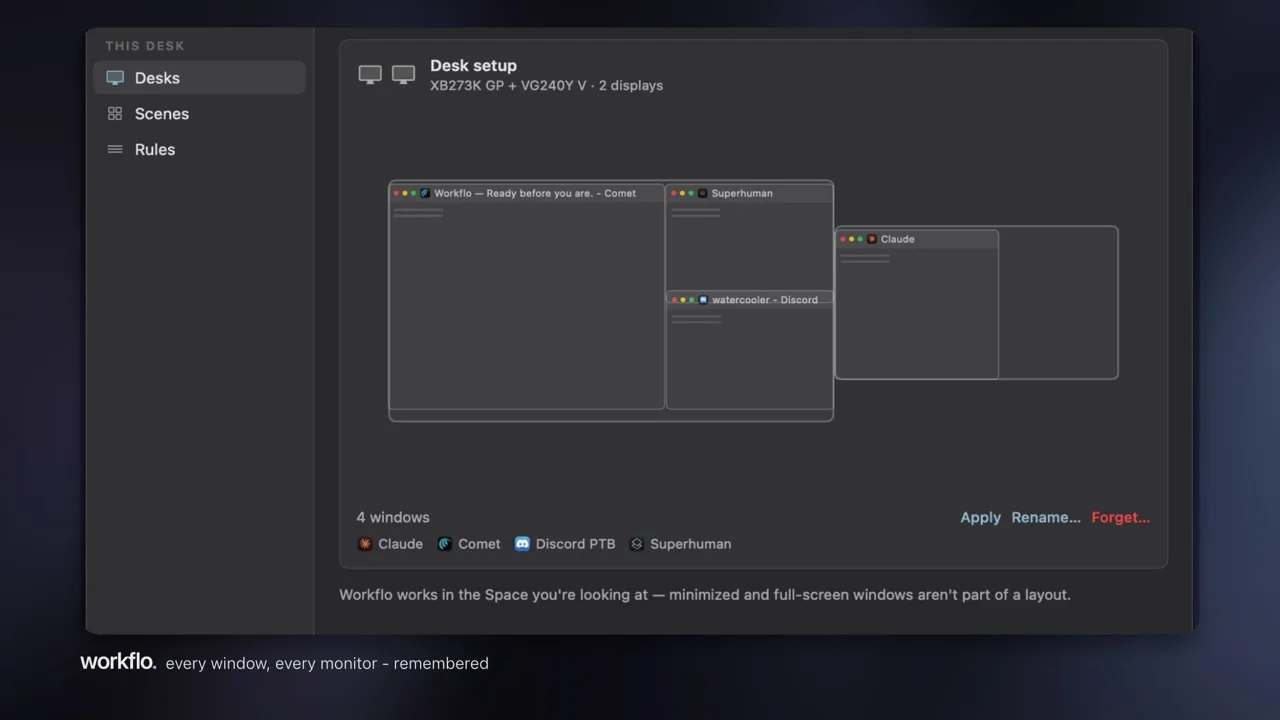
- Layouts that keep themselves current. Workflo calls them Desks: one per display setup, learned on its own and updated as you work. When displays change, everything snaps back where it belongs.
- The whole workspace, not just the windows. A Scene opens the apps that aren't running, places every window, and clears the rest.
- Before the moment. Scenes apply on their own from your calendar or the clock, so the workspace is ready before the call or the focus block starts.
- New windows land in place. As apps open, their windows go to the positions Workflo remembers.
At a glance
The difference is who keeps the layout current, and how much of the workspace is in scope.
| Display Maid | Workflo | |
|---|---|---|
| Layouts come from | Positions you arrange, then save | Learned on its own, kept current as you work |
| When displays change | Restores the saved set automatically | Restores the learned Desk automatically |
| Other automatic triggers | Events on your Mac, such as an app launching | An app launching, your calendar, and the clock |
| Apps that aren't open | Left alone; it isn't an app launcher | The Scene opens them as it applies |
| Apps in the way | You hide or quit them | The Scene clears them |
| Several layouts per setup | Profiles, switched from the menu or a hotkey | Scenes, applied by hotkey, calendar, or clock |
| Runs on | macOS 10.13 or later, Intel or Apple silicon | macOS 14 or later, Apple silicon |
| Price | $5.99 on the Mac App Store | $15.99 (regularly $19.99) one-time, 7-day free trial |
The whole field, honestly
A fair comparison names everyone. Here's the category in one table; every tool in it is good at what it does, and the last column is the only line Workflo draws.
The last column is the whole comparison.
| Tool | The model | Price | Starts on its own? |
|---|---|---|---|
| Display Maid | Save & restore per display setup | $5.99, Mac App Store | Partly; restores positions you saved when displays change |
| Stay | Store & restore per display setup | Free | Partly; restores windows you stored when displays change |
| Moom | Palette, grids, saved layouts | Paid | Partly; replays a snapshot you saved when displays change |
| Rectangle | Keyboard + drag snapping | Free, open source | No; waits for your shortcut |
| Rectangle Pro | Deeper snapping: custom areas, app layouts | Paid | No; still your keystroke |
| Spectacle | Keyboard snapping (retired 2019) | Free, open source | No, and no longer maintained |
| Magnet | Drag-to-edge snapping | Paid | No |
| BetterSnapTool | Drag + keyboard snapping, custom snap areas | Paid | No |
| Loop | Radial snapping menu | Free, open source | No |
| Amethyst | Automatic tiling | Free, open source | Tiles continuously; no saved layouts, no staging |
| yabai | Scriptable tiling window manager | Free, open source | Only what you script yourself |
| BetterTouchTool | Gestures and snapping (and much more) | Paid | No |
| Divvy | Grid-picker resizing | Paid | No |
| Swish | Trackpad-gesture snapping | Paid | No |
| Raycast windows | Snapping and saved layouts, by command | Free tier | No; runs when you invoke it |
| BetterStage | Named multi-display Stages, Bento tiling | Free (3 stages) / Pro $19.99 one-time | No; manual switch, Stages default to one shortcut per slot (⌥1 to ⌥9), rebindable per slot |
| Workflo | Workspace automation: Scenes + Desks | $15.99 (regularly $19.99) one-time, 7-day trial | Yes: your calendar, the clock, and display changes |
Keep Display Maid, or switch?
These two overlap more than most pairs in this space, because both restore on a display change. Pick one for that job: run both and two apps move the same windows at the same moment. If you try Workflo, quit Display Maid for the trial week.
If you saved your layout once and it rarely changes, Display Maid does that job well, and the restore half of Workflo adds little. This page is for the day the saved set is out of date again, or the windows came back and the apps you needed didn't.